
Migrating 6.5 billion rows from MongoDB
We moved 6.5 billion rows of Gauges data from MongoDB into ClickHouse.


At the start of this year, we acquired Gauges, a simple analytics platform. We’ve just finished moving 6.5 billion rows of historical analytics data from its MongoDB database to ClickHouse, the same database we run Fathom on. I’m going to share how it all went down.
New customers and old promises
When we acquired Gauges, we had no idea how many customers would want to move to Fathom. We knew we were going to offer everyone a path forward with Fathom and offer to migrate their data for them. Lots of customers got back to us and were excited about the new home for their data.
We then made two important promises. First, Gauges customers would not need to replace the tracking code on their websites. We would route the existing Gauges ingest endpoints into Fathom.
Second, we had a conversation with an enterprise customer coming from Gauges. We promised they wouldn’t have to rewrite any of the API code that they used as part of this migration.
That meant we had to migrate all of the historical data whilst keeping the live product and its public interfaces working as they always had. Two jobs, really: replace the application, and move the data.
Who doesn’t love a good rewrite?
We inherited a Ruby on Rails application on AWS. It used Elastic Beanstalk, EC2, SQS, ElastiCache, an Application Load Balancer, VPC, CloudWatch, S3 and CloudFront. The infrastructure cost thousands of dollars each month.
I know all of those AWS services well, and I’m confident I could have modified the existing application, but I hadn’t worked with Ruby since I was 15. I didn’t want our long-term plan to depend on me deploying changes in a language that our company isn’t deeply familiar with.
So I rebuilt the application in Laravel, and it was split up into two subprojects:
- Gauges Ingest conversion layer into Fathom ingest
- Public API layer for the enterprise customer
I went through the API, the ingest endpoints and the underlying data structure. The new application would have to handle the exact same responses and return the exact same data structure.
After spending some time building it, testing it and making sure it worked, we had an application ready for production. The data, however, was going to be a whole different story.
Finding the data
Gauges was built in 2011, years before ClickHouse existed, and stored its analytics in MongoDB.
I had never connected to a MongoDB database in my life. When I was younger, MongoDB was a meme, and I spent my career avoiding it. Yes, I’m aware it’s now a very successful multi-billion-dollar database company.
I found the EC2 instance running MongoDB, added my IP address to its firewall and connected from my machine. The database contained 4,705 collections and nearly 7 billion documents.
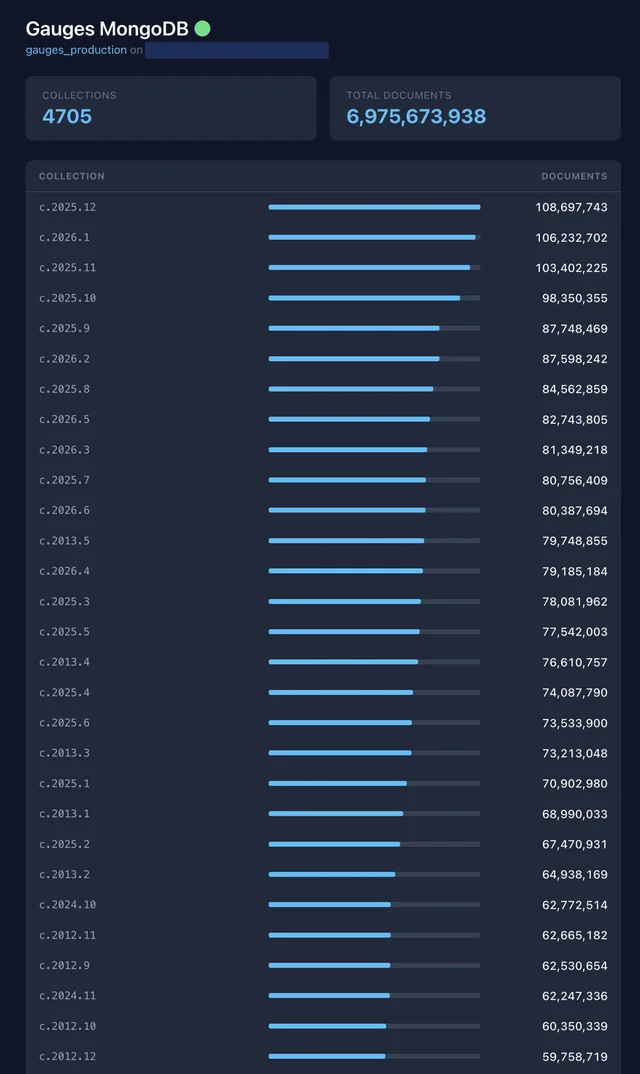
The data was split into collections named by content type, year and month. Historical collections were immutable, which is my favourite kind of analytics data.
But MongoDB is a document database. I couldn’t write a familiar SQL query and start pulling rows into ClickHouse. I needed a way to read it safely, in chunks, from our production Fathom application.
Four hours from deadline to plan
To stop myself over-analysing the problem, I emailed Gauges customers and told them I would start migrating their accounts the following week.
No, I didn’t have a complete plan.
I’ve found that having a deadline makes me move faster. Less than four hours after sending the email, I had the answer.
The MongoDB version was outdated, so our modern PHP application couldn’t connect to it. I could, however, create a Laravel Forge server with a compatible MongoDB binary. That server could communicate with the database, and our production application could communicate with the server.
I turned the Forge server into a small, private, read-only migration API for us to use. Fathom would request data from it; it would read from MongoDB; and the response would be returned to our existing migration code.

This let me keep all the account mapping, ClickHouse configuration and migration state inside Fathom. The Forge server had one job: provide a narrow interface to the old database.
Building the migration API
I explored the Gauges codebase and mapped its collections into endpoints. Then I built a proof of concept in our local admin panel that read Gauges data through the migration API.
It worked.
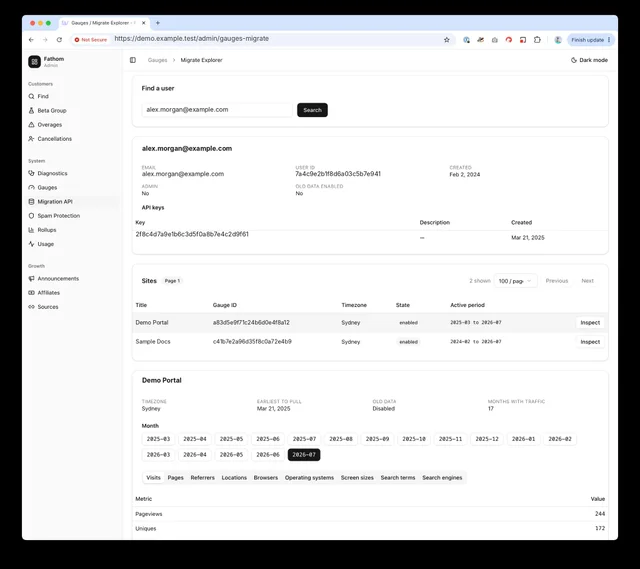
The explorer showed the Gauges sites on an account, the months available for each site and the metrics in each collection. We could inspect the protected MongoDB data without connecting our main application directly to MongoDB.
Now we could build the actual migration.
Much ado about mapping
Some Gauges customers had already created sites in Fathom and installed our tracking code. Others still used the original Gauges snippet. We had to support both.
For 99.99% of sites, we could recreate them in Fathom and map them to a Gauges site ID. For a few accounts who had already created their sites in Fathom, we had to perform manual overrides.
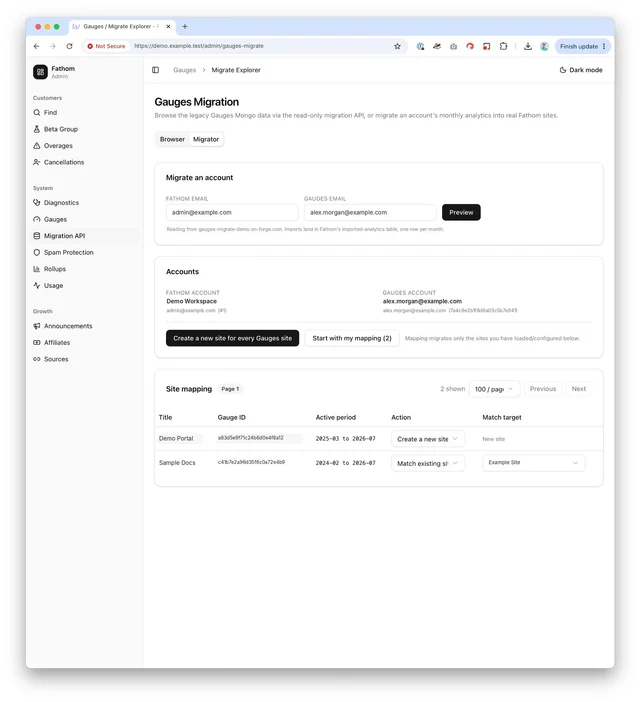
Gauges stored its history as breakdowns across dimensions such as pages, referrers, browsers and locations. It wasn’t the fully broken-down event data that Fathom collects, but it was similar to the aggregated Google Analytics data we already import.
That meant we could preserve the useful history in Fathom’s imported analytics tables. Customers would see their historical totals and breakdowns alongside their new Fathom data.
Finding the bottlenecks
With the mapping in place, I built the migration runner. I started cautiously with low concurrency because I didn’t want to hammer a database that had been quietly running for years.
The migration was slow, so I started profiling each part. I assumed the old MongoDB server would be the first bottleneck. It wasn’t.
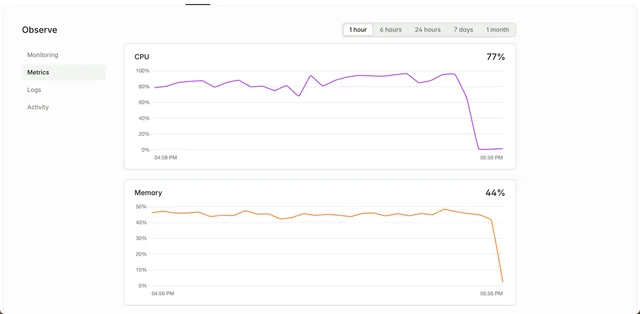
The Forge server running the migration API had only one vCPU and was stuck at 100% usage. I had created it months earlier and forgotten how small it was. I upgraded it to a CPU-optimised server with 16 vCPUs, and the migration flew.
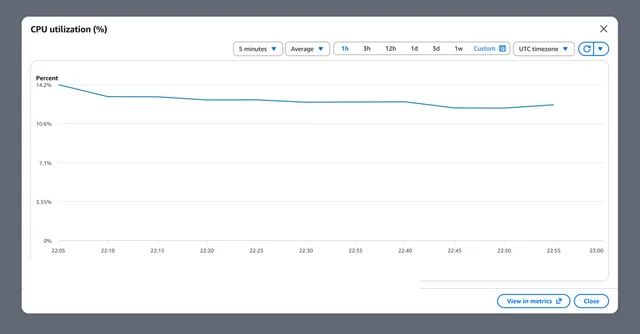
Meanwhile, the old MongoDB instance barely noticed what was happening. Its CPU stayed at roughly 12% to 14% throughout most of the migration.
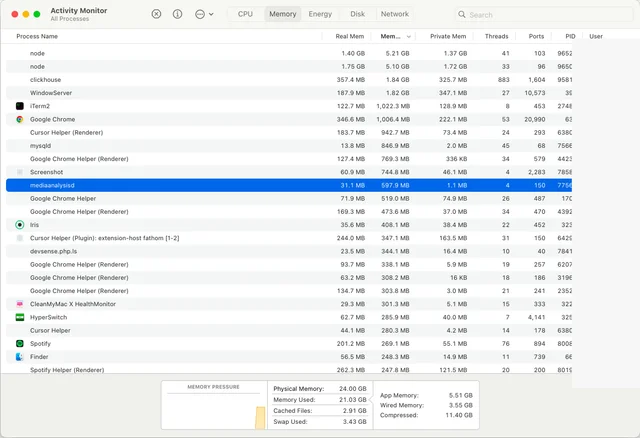
Then my MacBook Air became the bottleneck.
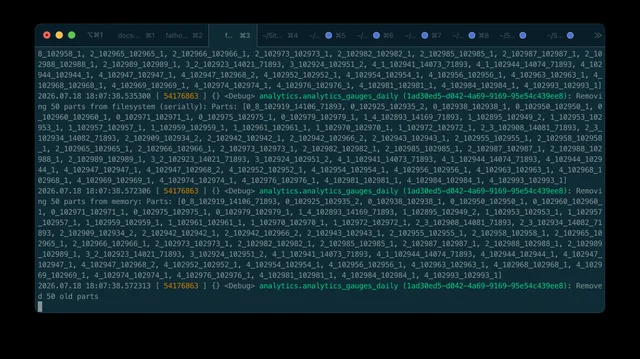
was running ClickHouse locally for testing purposes. Once I increased the number of migration workers, the local ClickHouse server began consuming all the memory on my MacBook.
I had an M4 Mac mini sitting on my desk, but setting it up would take time I didn’t have. ClickHouse Cloud was another option, although using it for this test would add network latency.
By this point, I had run and reviewed enough migrations to trust the code. The worst case was manageable: delete the imported sites and data, fix the problem and run it again. I moved the migration runner to production.
Local success, production timeout
We hit a different problem in production. The initial site sync, which copied all Gauges sites to Fathom, finished quickly on my machine but exceeded AWS Lambda’s 10-minute timeout after deployment.
Network latency between production services turned thousands of small requests into a real delay. I have been building software for nearly 20 years, so I know local and production environments behave differently. Still, the commands I ran locally to “save time” cost me a full day when we were ready to launch.
Once that was fixed, I synced the first large account and watched the sites appear in Fathom. The history was moving. Now I needed to prove the compatibility API was telling the truth.
Prove it
I built a live comparison tool. It fired the same request at our compatibility API and at the live Gauges API, using the same partner token, then diffed the two responses side by side.
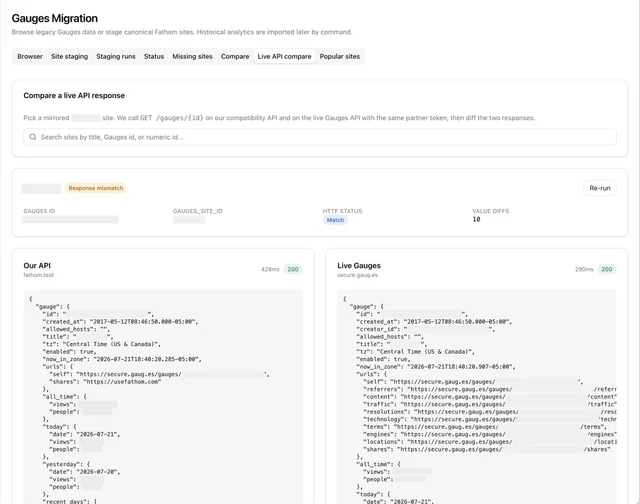
^ The screenshot says fathom.test for Our API but that’s hangover code, this was in production
The all_time totals never matched exactly, and they were never going to. The live API kept collecting traffic after our fixed migration cut-off, so it remained slightly ahead of us. Once I accounted for that, every other field lined up.
I tested the broken-down data separately by running the imports and reviewing it manually. We knew how Gauges transformed & stored data, so that was easy, and we just had to match the data on a sample of sites to be confident. Then we’d be able to sum it all up at the end.
Too many buttons
I had built and tested this migration so many times. Over the course of testing, I added debugging screens, changed commands, rewrote the deployment checklist and created several ways to start each stage. Eventually, my head hurt whenever I looked at it. That is usually a sign that the system has become too complicated.
I removed the extra controls and built a single migration page. Each step had to finish successfully before the next button appeared. Nothing chained automatically, and there was an emergency stop if I saw something wrong.
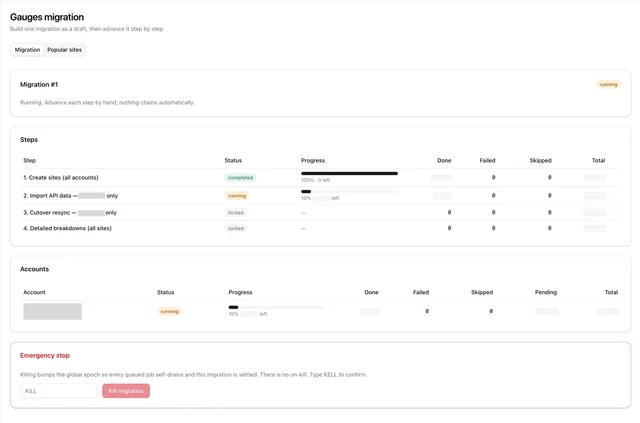
The emergency stop in that screenshot didn’t last. Every queued job read that one row before it did anything, which turned roughly 50,000 jobs into a single-file queue, each waiting a median of 504ms just to ask permission to run. My safety valve had become the bottleneck, so I took it out.
The simpler interface mattered because the cutover sync had to run shortly after we moved ingest and the compatibility API to Fathom. I could see the exact state of every account without having to remember a list of commands.
My brain finally felt calm. We were ready.
The great cutover of 2026
Ahead of migration day, we lowered the DNS TTL for track.gaug.es and secure.gaug.es to 60 seconds.
We moved the API endpoint to CloudFront and backed it with our compatibility API. We moved the tracking endpoint to Bunny, which routed requests into Fathom’s ingest environment.
Ingest needed a different approach. Customers had the old Gauges script installed across thousands of websites, and we were never going to ask them to swap it out.
We wrote a new, cookie-free Gauges script that supported the existing browser API. We also added middleware to Fathom’s ingest application that understood requests from both the original script and our replacement.
The result was the part I cared about most. Existing tracking code continued collecting data without anyone visiting the website, and the integrations still called the Gauges API and received the expected responses. We rebuilt the endpoints that were actually being used; the rest now point at a sunset page.
Then I sat and watched new events land. A visit to a Gauges-tracked site required updating the numbers in the compatibility API response and on the Fathom dashboard. Once both ticked up together, I knew the tracking script, ingest, and the API were all wired to the same place.
The final data import
Once the sites were in Fathom, the compatibility API was stable, and new traffic was reaching our ingest, we imported the remaining historical breakdowns.
This included pages, browsers, referrers, locations and the other dimensions stored in Gauges. Gauges kept day-level detail, and we could have imported all of it, but rolling it up to the month level cut the number of requests by roughly 30x. When you’re reading back years of history, you actually look at monthly totals, so that was the trade we made.
It took a long time. There were a lot of sites, a lot of collections and 6.5 billion rows to work through. But the migration dashboard let me move one verified stage at a time until every account was complete.
And that was it. We moved 15 years of analytics history from MongoDB into Fathom, replaced the Gauges application, preserved its API and tracking interfaces, and retired the inherited infrastructure, which took a five-figure sum off our annual hosting bill.
I am now officially done with database migrations… for now.