
How to set up and use Fathom Analytics
Fathom is a simple, privacy-first Google Analytics alternative. You get one page of useful data, not thousands of reports to hunt through.
Let’s walk through setup from the script to your first email report.
Add the script
One line of code, or an integration if you’d rather not touch templates.
Your dashboard
Pages, referrers, events, campaigns and live visitors, all on one screen.
Email reports
A weekly or monthly snapshot in your inbox, for one site or many.
Add our script to your site
To collect data from a site, blog, store or web app, add one line of JavaScript to your header. That’s the whole install.
You can paste it in yourself, use our WordPress plugin, or pick another integration if you’d rather not touch templates.
<script
  src="https://cdn.usefathom.com/script.js"
  data-site="YOUR-SITE-ID"
  defer>
</script>Additional features you can set up here
Block your own visits
Keep your refreshes off the dashboard with IP blocking or a snippet in your console.
No cookie banner needed
Fathom doesn’t use cookies, so you don’t need a consent pop-up for analytics. Read how we stay GDPR compliant.
At least 50 sites on every plan
Add sites for yourself or your clients. Need more? Extra packs of 50 are $10/month.
Works with your stack
WordPress, Ghost, Webflow, Next.js and plenty more. If we don’t have a plugin, the same snippet still works.
Get to know your dashboard
The dashboard is the centre of Fathom. It’s one page of what’s working on your site: pages, referrers, conversions, campaigns, devices, countries and browsers.
You can see who’s on the site right now, and click any number to filter the whole page. If you look after more than one site, all sites view gives you a combined snapshot.
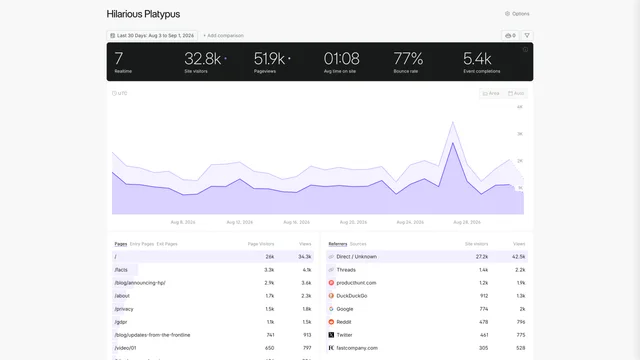
See what’s popular on your site
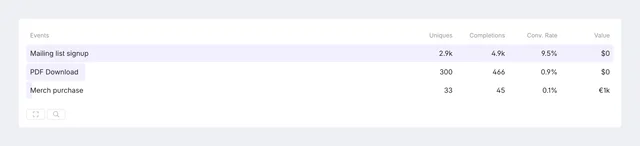
See how your events are converting
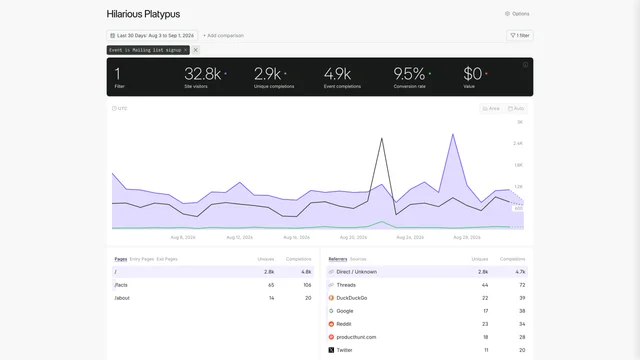
Add a filter to see one event, page or campaign
Additional features for your dashboard
Dashboard sharing
Set each dashboard to private, public, or protected by a password. The person you share with only sees that site.
Dark mode
Dashboards follow your system settings by default. You can force light or dark from account settings.
Multiple domains
If a few domains or subdomains should share one dashboard, set up multi-domains.
Bring history with you
Import GA4 data so you keep the past, and connect Search Console to see search terms on the same page.
Email reports
Send yourself, a colleague or a client a weekly or monthly snapshot. One site, several sites, or everything on the account. You get the overview without logging in.
Each site stays separate. If you share a dashboard or an email report, they only see the sites you included.
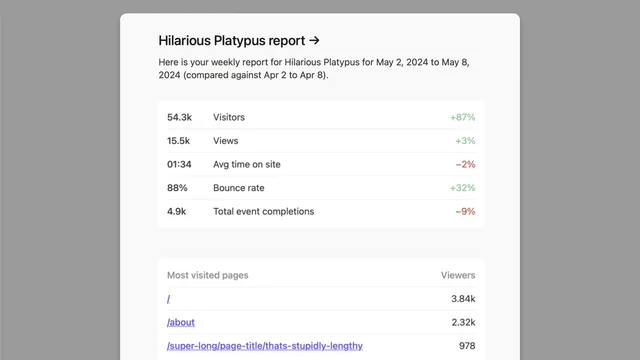
A single-site report, handy for a client who should only see their numbers
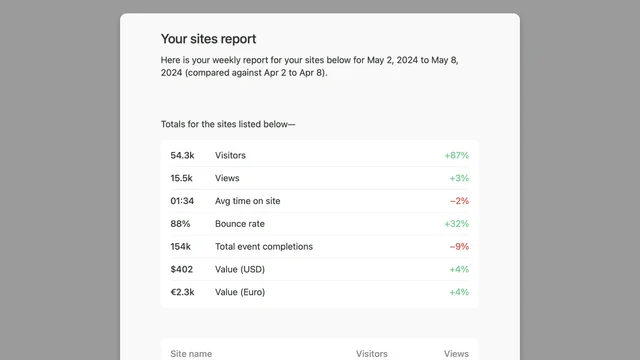
A multi-site report with a snapshot from several dashboards
Additional features for reports
One per client
Include only their site, so they never see another client’s traffic in the same email.
On every plan
Weekly and monthly reports are included for every customer. No extra fee, no pageview minimum.
There is no step four
We built Fathom to be quick to sign up for, quick to install, and quick to read. Most people go from a free trial to live stats in a few minutes.
Where to go next
- See everything Fathom includes
- Why data isolation matters, wherever your company is based
- Why Fathom is a strong Google Analytics alternative
- How we process data without tracking people