
Two database migrations and a divorce
How we rebuilt Fathom’s analytics engine and migrated 65 billion database rows.

I’ve just finished the most challenging database migration of my life. We have officially shipped Fathom Version 4, migrated over 65 billion rows to a brand-new database setup, and eliminated every single piece of technical debt we had. The project took hundreds of hours over a handful of months and was handled entirely by a single software engineer (me). I’m going to share all of the details with you, so sit back, grab a coffee and let me take you on a journey.
The origin story
Back in 2019, we were receiving an increasing number of questions from customers about emerging cookie laws. Despite being simple, respectful of privacy, and collecting a genuinely minimal amount of data, we were still using cookies. These customers were concerned and wanted us to stop.
The problem was that we needed those cookies to know whether a visitor was unique to the site and unique to the page. We stored data like this:
{
    site_id: 'ABCDE',
    hostname: 'https://apple.com',
    pathname: '/',
    is_unique: true, // First time on site?
    page_unique: true // First time on page?
}
So we couldn’t just “drop the cookies” because they were a core part of our analytics ingest infrastructure.
So we were stuck. We knew the laws were changing, but our entire data model relied on cookies to determine whether a pageview was unique. Analytics software has used cookies for unique visitors since dinosaur times. How do you track uniques without cookies? You can’t use access logs. That’s raw data across millions of websites and includes personal data (IP addresses). You can’t just fingerprint users either, because then you’re able to uniquely identify them, potentially for years, and the fingerprint is re-creatable personal data. We had nowhere to go.
We don’t want the data
Raw access logs were a non-starter. An owner of a website can choose to use raw access logs on their own site, sure, but we’re an analytics company tracking billions of unique website visitors across millions of different websites. We don’t ever want to track individuals across multiple sites and store their browsing habits.
Imagine an advertising company. Let’s call them Google. They have an interesting history regarding protecting their users’ privacy. Here’s the difference between running your own raw access logs and what happened when you put Google Analytics on your website:
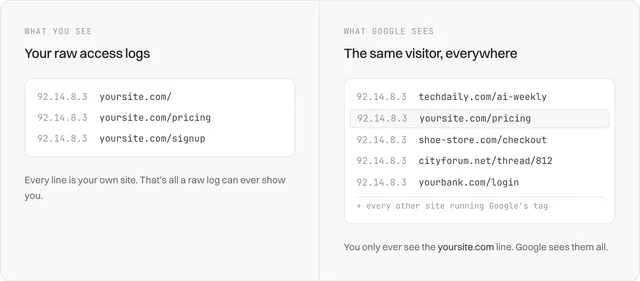
You fed into an advertising company’s ability to watch where individuals go around the web.
So that was our starting point. We couldn’t solve uniques by fingerprinting users or storing IPs, because it would give us data on how a user behaves across the internet. But then we realised the fingerprint might actually work.
The birth of privacy-first analytics
Typical fingerprints couldn’t work, because they’re re-creatable and can identify individual website visitors. If the contents of [ip]:[deviceTraits] always yielded the same outcome, we’d be storing personal data. That was forbidden per the specification.
Maybe we could hash the plain text? Then surely that would be okay, because we’re not storing personal data; we’re storing hashed personal data. No, the lawyers said. That’s not going to pass, because it can easily be re-created the minute you have the IP and the device traits. If it can be easily tied back to a user, you are processing personal data.
We reviewed the privacy laws and realised they were right. It reminded us that, back in the day, the industry realised a simple MD5 hash of a user’s raw password wasn’t secure because bad actors could use rainbow tables to match an MD5 hash to a raw password. This was before password managers became as popular as they are, so if someone cracked your password, all your internet accounts were often hacked. The industry’s fix was a salt: md5('$jlJhiuweh2sl40' + $rawUserPassword). And software engineers hedged further with a unique salt per user. And then it hit us, salts were the solution for Fathom’s cookie headache!
Not just any salt. Fresh, grass-fed, organic salts, that were refreshed daily, loaded in with the site ID, hostname, and user’s fingerprint. The salt would be the SHA-256 hash of a random string.
The final user identifier was:
hash('sha256', $siteId . $ip . $userAgent . $dailySaltSha256)And the salt would be gone within 24 hours or less, making it impossible to reconstruct the hash. Actually, my first-ever blog post covered this in detail.
We then performed a risk analysis. What’s the worst thing that could happen? You cannot brute force a 256-bit hash. In the blog post at the time, I wrote:
“Brute forcing a 256 bit hash would cost 10^44 times the Gross World Product (GWP). 2019 GWP is US$88.08 trillion ($88,080,000,000,000) so we’re at least a few dollars short of brute forcing a 256 bit hash.”
And even if you assumed a malicious actor had targeted a specific individual, they’d need the IP address and user agent of that person; then they’d need to hack into our database to get hold of all the unique SHA-256 identifiers we had. Then they’d have to create hashes from that IP and user agent, our salt for that day, and the site ID of every single Fathom tracking ID. And then, once all of that is complete, they’d be able to see the sites that person visited for a single day. And at that point, if all that had happened, we’d be facing bigger problems.
Without the daily salt, they’d be able to re-create multi-year activity for a single user. That would be a disaster. The daily salt is what makes this solution beautiful.
And this solution, which our small company developed for analytics back in 2019, is now everywhere. Multi-billion-dollar companies read our methodology (and my blog posts!) and use the exact same system. It’s awesome because a simple innovation in how analytics is done has yielded a better internet for everyone.
Compounding technical debt
We happily went along with this solution for six years. Our data model remained largely unchanged, with a few tweaks along the way, including the move from MySQL to SingleStore in 2021 to address recurring database crashes. We actually had a user_signature column stored with the pageviews since 2021, but, and this is a big but, we never actually used it.
Instead, this is how we handled incoming pageviews and events:
{
    site_id: 'ABCDE',
    hostname: 'https://apple.com',
    pathname: '/',
    is_unique: Cache::get($uniqueIdentifier),
    page_unique: Cache::get($uniqueIdentifierIncludingPathname)
}
Those two hashes were stored in cache between requests. I’m oversimplifying here, because we also had things like $uniqueIdentifier + '_source' to link UTM parameters and referrers to events, but the key piece of technical debt was that we relied on an external cache to establish the state of our analytics data on ingest. And that means that we relied on is_unique and page_unique to establish unique website visitors across our entire application.
As the privacy-first analytics space evolved, users asked for entry pages, exit pages, session-level UTM data, and more. But because our entire model, from ingest through to dashboard, relied on SUM() over the unique columns, and uniques were established on ingest, there was no easy way to introduce this. We considered adding entry_page and exit_page columns. The entry page was easy in theory and could be cached between pageviews. Exit page wouldn’t work. We’d have to update all previous pageviews each time the user viewed a new page (since their exit page would’ve changed). And I was not about to run ingest-level analytics updates at scale, because I’d already been burned by that approach.
We battled this for a long time, balancing running the business as a team of three, building features, and figuring out how to alter our structure to meet the software’s desperate needs. It pains me to say it, but we went years without this functionality. We were in too deep and had no clear way out. Every time we got close to a data breakthrough, a gigantic blocker would collapse months of work. Don’t get me wrong: we still shipped functionality, grew the business, and had thousands of happy customers, but the data side was struggling. To say we were burned out with data would be an understatement.
Too many problems, so why am I here?
The reason this went in circles was that I wanted to break the project into small, actionable parts, and I wasn’t willing to accept that we were dealing with a gigantic and tangled mess of technical debt. And because the simple, manageable steps weren’t appearing, I remained in analysis paralysis.
Our data problem list had compounded to the point where it was completely tangled and felt impossible to address:
- We couldn’t run a
COUNT(DISTINCT())on our data because we had V1 and Google Analytics data (all rolled up, marked withtype=site_statsortype=page_stats) mixed in with Fathom V2 data. Having this in the same table provided speed benefits for certain queries but was a nightmare for everything else. Oh, and count distinct doesn’t scale for large amounts of data because it would have to run across SHA-256s and keep results in memory. Even with HyperLogLog, which uses way less memory, it’s still SLOW. - Fathom V2 data duplicated rows because of our append-only duration/departure rows. A simple
COUNT(*)on the pageviews table wouldn’t work, because we needed to exclude the departure row. But we needed the departure row because it hadexits=-1to undo the assumedexits=1on the first pageview. Getting exit count alongside time on page/site became messy. And if we tried to do a union of counts for non-v1/ga, non-duration appends, etc., it just gets SLOW. - We were unable to run entry/exit pages at scale. We had a query structure using window functions that delivered the data, but it fell over even on our beefy database cluster.
- We had no concept of session-level data for website visitors. Finding unique users across a referrer meant scanning every single pageview. We wanted a sessions table and an events table.
- We needed to update the exit page for historical pageviews. Each new page a user visited meant that their exit page on a pageview row would need to be updated. This doesn’t scale with OLAP workloads, even on an epic HTAP database like SingleStore.
- We were unable to process pageviews out of order (e.g. in an unordered queue) because our cache drove uniques. If an old pageview was processed, it would impact the cache in various ways. This was a huge headache, and it would take a thousand words to explain the issue, but the cache was effectively built on the assumption that the pageviews and events would be processed in order. So we were limited in terms of our ability to process things in the background.
- We relied on a
goal_idcolumn in the events table, tied via transactions to the same database, and we wanted to split OLTP and OLAP workloads. Every time a new event hit Fathom, we had to open a lock to create an entry for the event in the goals table. - Referrers didn’t persist throughout all pageviews. If a visitor came from Google, then visited five other pages, only the landing page would show Google. The other four would be +0 uniques and +1 pageviews for direct.
- Bounce rate was done over a 30-minute session rather than daily. Acceptable in some products, but it always felt wrong to me.
- Time on site was time between pageviews we processed. We never had a separate departure ping. So the last page of every session was 0 seconds, and we had no ability to get the duration.
- There was a disconnect between the top totals box and the people metric in the page stats box when filtering by pathname, which led to a lot of support questions.
We had so many problems, which is the reality of being the first mover in a new market, but those were the big ones. We invested heavily (money and time) pursuing an analytics_sessions and analytics_events database table model, where analytics_sessions would be one row per website visitor, with upserts that would update entry/exit page and then we’d use the timestamps to update those columns conditionally (e.g. if the timestamp is < session.entry_timestamp, then that pageview would take priority over what was held in sessions). That would have let us process pageviews out of order. Ultimately, after speaking with a couple of friends, I realised it wouldn’t scale without various trade-offs, so it was binned (American translation: trashed).
Everything was intertwined in a complex web of headaches. There’s no amount of explaining I can do about the complexity of the technical debt we had, but if you’re a software engineer, you’ll understand. An additional problem we had was that, even though we had all of these issues, our customers were still happy. So it was easier to leave things as-is than rock the boat. But your customers rely on you to make the right decisions for the software they pay for. And I became deeply aware that this change couldn’t be done in small chunks. It required a refactor of our entire analytics module.
Breaking the habit
As we headed into late 2025, I paused my “small change” philosophy. It just wasn’t possible with this project, and we had many failures behind us. I paused our roadmap and committed to focusing on the data project. I brought in an incredible database contractor, reviewed options, and a plan began to form. The implementation was going to be absolutely brutal, and I had no idea how long it would take to complete.
Then on 24 November 2025, a miracle occurred. A new AI model, Opus 4.5, launched. I’d tried coding with AI before and I didn’t like it. Everyone had been hyping it, but it was effectively an autocomplete that got in my way. Opus 4.5 changed everything. Suddenly I was in charge of structure and direction, but I didn’t have to write the code. I still read every line, but I could go between different implementations in minutes rather than weeks. After using Cursor on multiple smaller projects, I was fully addicted, spending 8+ hours a day with it, and I was now ready to take on the biggest challenge the business has faced since the great DDoS attack of 2020.
The divorce
Over the last few years, I’ve become aware that we don’t have a true HTAP workload. We do OLTP and OLAP, but for the most part they’re separate. In late 2025, we started flirting with ClickHouse and PlanetScale. ClickHouse is an open-source OLAP database used by everybody. PlanetScale is the industry leader for OLTP workloads. But what was most interesting to me is that, as I was talking with them, neither of them wanted me to commit to an annual contract. It caught me completely off guard, but it built trust from the start.
Ben Paul (ClickHouse) helped me refine our new ClickHouse schema. He also actively helped us SPEND LESS. I’m still in shock about how they approach solutions engineering. He told me, “Hey, you can scale this down as I don’t think you need this.” This kind of behaviour in a company builds long-term trust because it shows they care about our relationship. Ben and Luis Neves even had a call with me to go deeper on how ClickHouse worked.
For the PlanetScale side, Chris Munns helped me understand PlanetScale and supported my migration of our OLTP workload (which was tiny compared to what they’re used to). Ben Dicken was also nice enough to teach me how their database replicas work.
On 2 December 2025, I gave SingleStore formal notice that we wouldn’t be renewing our contract. When I sent that email, the countdown began. I hadn’t built anything yet, but I knew I needed time pressure to make me move fast. We had a hard deadline of 28 February, our contract end date, to get our analytics engine completely rebuilt and all of our data migrated.
In hindsight, the undertaking was crazy. I had just under three months to rewrite our entire analytics system, dashboard, and ingest, then migrate everything over by myself, whilst also juggling various other business pieces and being a present dad. But I was in it now, and there was no turning back.
Unjoining the joins
As we began, I realised we were stuck in the mud. It was impossible to separate our OLTP workload (users, goals, countries, sites) from our analytics workload because we were performing so many joins in SingleStore. So that was the first area of attack.
We decoupled every join category:
- Goals, previously fetched via a JOIN between our analytics events table and the goals table (to map
goal_idtogoals.name), became separate lookup queries with dynamic array mapping. - Countries were converted to a cached static map (no more database table).
- All relationships, such as
Site::pageviews()andEvent::goal(), were rewritten.
The initial deployment of all this remained in SingleStore. The only difference was that the data was now retrieved via separate queries. We had untangled our OLTP workload from our OLAP workload.
That’s a lot of cash for a cache
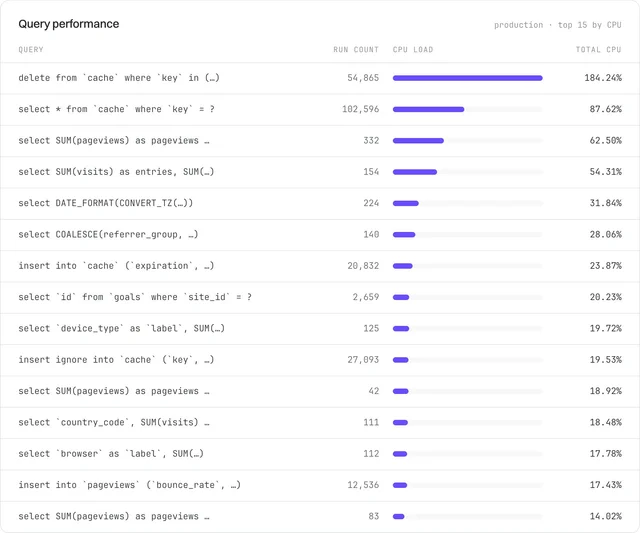
One of the benefits of SingleStore was that we got so much RAM with our scaled-up cluster. The operations to SingleStore rowstore were extremely fast, and we were reading large keys, but the deletes regularly consumed a lot of CPU. I pulled some data and saw how part of our cache workload dominated CPU usage. The deletes were coming from Laravel because that’s what their cache database driver does: when it fetches a key that’s expired, it deletes it RIGHT THEN. And the funny thing is, that approach is absolutely fine, because who uses a database as their cache layer at scale? Nobody. They’re surely using Redis.
Well, that wasn’t the case with us. Because we had all that RAM, it made sense to use SingleStore for cache. I fully believed it was the right move at the time. But the reality was that we were using an HTAP database for a cache workload. For every pageview we processed, there were 3-8 interactions with the database. We were using an extremely specialised database for a key/value cache workload.
The toggle
When we began working on the analytics rebuild, we had a breakthrough that feels obvious in hindsight. We realised we could add a toggle button on the dashboard, visible only to admins, to switch between data sources. That meant I wouldn’t have to modify the SingleStore analytics module at all. We could duplicate our code, convert it to ClickHouse-friendly queries, and nobody would ever notice because they couldn’t see the toggle.
The new ClickHouse analytics module was written entirely by Cursor and was thousands of lines long. I read every line and was very happy. All the code was duplicated from our original class because I assumed we would remove the SingleStore version anyway.
In the past, we tried to feature-flag a single class to behave differently based on the user. But, as you can imagine, that was a huge mess. This time, I went way higher up the chain and built the toggle at the controller level. And just like that, we had current visitors and all of the dashboard data boxes loading from ClickHouse whenever we chose it.
Planning the evacuation
With the unjoining complete, we could split the OLTP and OLAP workloads apart. And with our schema copied to ClickHouse, we were ready to get our data moved over for comparison testing (via the toggle!).
But now we faced a new challenge: how were we going to get tens of billions of database rows from SingleStore into ClickHouse? If we couldn’t do this, it was game over.
This was the largest amount of data I’ve ever moved in any project. And because it was going between different database software, I knew it was going to be a headache.
I went through eight iterations of the migration script. I tried to be cute by creating a separate parquet file for each calendar day. The first problem with that was that I wasn’t using the sort key (site_id, timestamp) to fetch data, so my where timestamp between was SLOW.
The second iteration of the migration script kept trying to chunk by time, but it combined multiple days into a single chunk. Waste of time, not much better than iteration one.
For the third iteration, we moved to extracting the data by site and date. This meant we could use our sort key. This was awesome, since the read queries were now 75x faster, but we had a 33x variance between file sizes. No bueno.
As we approached fourth through eighth iterations, I wasn’t happy with the SingleStore -> S3 -> ClickPipes -> ClickHouse approach. I spent a ton of time experimenting, and we ended up realising that ClickHouse could use the MySQL protocol to read data from our SingleStore database (which was MySQL wire compatible). This was the breakthrough that changed everything.
By the time we got to version eight, I had built a sophisticated migration system with context awareness. I also profiled our migration obsessively because I knew we’d have to run it multiple times as mistakes were found, so throughput mattered. The conclusion was that we needed “site bundle” chunks to migrate a range of Site IDs, and “mega site” chunks to migrate large sites separately.
I actually ran this on my local machine, for maximum insight. We created the mega site and site bundle chunks in a local database based on the production analytics data. You can see in the image below that we had site bundles, allowing us to migrate site_id from 0 to 1946 in a single job because the data was only 800 million rows. It’s not in the screenshot, but we also had a chunk_type of “mega site,” where we’d have the start_site_id and end_site_id as a single site ID, and we chunked it by timestamp because it had billions of rows to move.
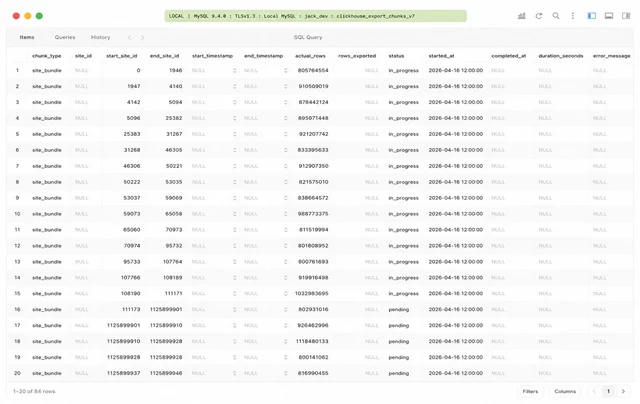
We also had built-in verification. An initial row count was established, and we then tracked rows_exported to ensure the ClickHouse destination matched the expected number of rows. This solution took so much work but was incredible.
In the end, we were able to achieve a throughput of 700,000-1,000,000 rows/second while migrating from SingleStore to ClickHouse. I was running the migration orchestration locally, using Laravel jobs, but the actual network transfer was between ClickHouse and SingleStore. I was querying ClickHouse, telling it to read from SingleStore, but that all happened in the cloud.
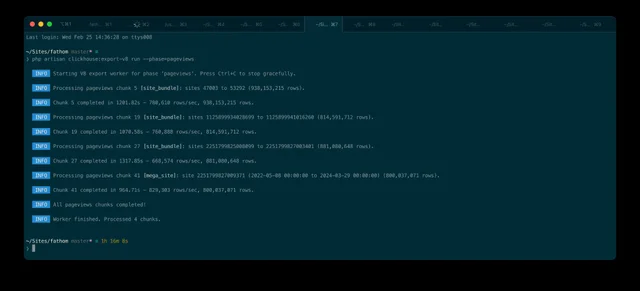
You’ll be so shocked to hear that I didn’t run the migration from my production database. Instead, I backed up the database, restored it to a gigantic (seriously, it was huge) SingleStore cluster so that we could hammer it with queries. We were also migrating data up to a certain, fixed timestamp, and historical data doesn’t change. This is what allowed us to use this migration model. We also scaled up ClickHouse to handle the demand.
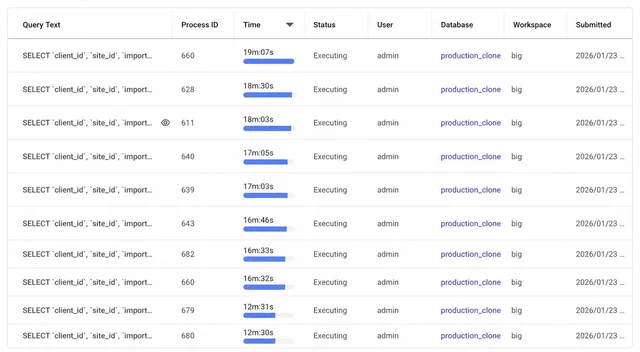
And just like that, we’d built the base of our migration, and I knew everything was going to work for us.
You’ve got to lose to know how to win
Our first ClickHouse design had a dedicated sessions table, three materialised views, and AggregatingMergeTree. Everything was looking gorgeous. Then we loaded the dashboard for a medium-sized Fathom site (~65-million-pageview) and it took 6-8 seconds to load. The same as SingleStore. Granted, we were on a much smaller ClickHouse plan, but I had still expected it to perform much faster.
I spent some time speaking with Ben (ClickHouse team) and doing my own debugging, and we realised that the whole structure wasn’t going to perform at the speed (and cost) we wanted. Because we’d still need to join sessions to events with certain queries and, whilst a COUNT(*) on sessions was FAST, as it was one row per unique visitor, everything else wasn’t.
It was at this moment that we realised we had to pursue an optimisation technique that we’d been avoiding for many years.
Expensive once, cheap forever
Whilst the single-table approach was fast for small and medium sites, it choked on larger sites when we filtered by referrers or did anything at the session level for the website visitor. So it was time to create rollup tables.
A rollup table is where you pre-aggregate data, grouped by various dimensions, so that you don’t have to run dynamic count/count distinct on the fly across millions (and billions) of rows in a query. Rollup tables mean that one billion rows could, realistically, be compressed to a few million to tens of millions of rows.
So we built four daily rollup tables and adjusted our model. We would roll up the data into analytics_daily, analytics_daily_breakdown, etc. and store a rolled_up_to variable in our database so that we knew when we had rolled up data available to us. And then, any data after rolled_up_to would be accessed via a query to the raw events table. And yes, you are right that the events query would be slow, but it would be limited to a small amount of data, and a continuous rollup would run in the background, advancing the rolled_up_to variable.
And the final landing point of our data model was a union query between the rolled-up data and the raw events. And because we stored the data in UTC and used a dynamic timezone on the frontend, we effectively had to use the UTC-rolled-up data in the middle but then use the raw events table at the edges, since the rollup was UTC. Does that make sense? It’s a weird concept but it allowed us to dynamically offer multi-timezone support on a single site whilst still using rollups for the in-between period. It was the 24 hours on the start and end of the date range which was a problem due to time zones.
It felt so great to have this figured out. We were even able to UNION the imported analytics data, which is now stored separately in analytics_imported. For the longest time, I’d tried to make all data fit one mould. A single table is perfect because we can just perform SUM()s, and a UNION would be a disaster, right? Turns out, no. The union performs great. And we ultimately needed multiple sources of truth for different query shapes. Up until early 2026, we had two tables, pageviews and events, holding Fathom V1 and V2 data alongside everything imported from Google Analytics. Running analytics beyond a simple SUM was expensive. The multi-table rollup model is what finally made large sites feel instant.
Oh, and that 6-8-second query dropped to sub-second, and every single dashboard saw a huge speed improvement.
The no-mistakes audit
Now we had the ideal model in place, we tweaked the migration code to write to the tables in a different way (a casual one liner in a blog post but a ton of work behind the scenes) and we were ready to test things.
We ran a migration, tested the data and everything was perfect. I was surprised but, if I reflect on everything, we spent hundreds of hours carefully planning this. We are obsessive about the protection of customers’ analytics data and we thought of everything.
We introduced a dual-write set-up to see how ClickHouse would behave on ingest. We used sync-writes first, to catch any errors with the data going in, and that was stable, so we moved towards asynchronous inserts (where we batched our writes to ClickHouse).
We were happy with everything and it was time to migrate.
Let the battle begin
On the morning of migration day, we spun our temporary, enormous SingleStore instance back up. We were now on an hourly deadline because the instance had to be switched off by 6pm. Contract deadline was 28 February and it was 26th February. We already had dual-write in place, so all data after a specified cutoff point (2026-02-26 15:00:00) was written to ClickHouse via dual-write. Our job now was migrating all the remaining OLTP workload to PlanetScale and backporting billions of database rows up to that cutoff date. I kept notes from the trenches as we went through this migration and I’m going to share transparently so that you see that migrations are a mess, even when you’ve done them many times before.
The first step I took was to make sure the dual-write between SingleStore and ClickHouse matched. If we had a discrepancy then the whole plan failed. All was good, so we continued.
We had a few hiccups due to the partition key we had chosen in ClickHouse. Long story short, the structure of the events table was built for ingest, not for the migration. So when we pounded ClickHouse with billions of rows, it accumulated “parts”, which were data that needed to be merged. This caused some big issues. But it was nothing we couldn’t handle.
We had to introduce a staging table (events_staging), with a different partition key, and then realised we needed to order this table by timestamp so we could do month by month processing from staging into actual (when we were ready to move the data from staging to production). I also realised I had to stop waiting on the migration and I needed to activate concurrency in myself. We had today and tomorrow to finish this up. We could do it.
At this point, the remaining tasks on my list were:
- New SingleStore database backup, as we had to advance the cutoff date, since the parts issue had led to data loss. No problem, we had a dual-write in place for this exact reason.
- Restore SingleStore database to our big, temporary cluster (simple but slow).
- Increase ClickHouse cluster size for import workload.
- Run migration to import our Google Analytics imported data (no staging needed).
- Validate all migrated data against production SingleStore database.
- Finish implementing lazy goal creation, query changes and get it out of the hot path (ingest).
- Remove event property creation on events (this was old code and hasn’t launched yet).
- Run ALTER TABLE events DROP COLUMN goal_id in production as not needed.
- Build departure ping endpoint and add into the script for ClickHouse, so we’re no longer using the server to track time between pageviews.
- Create a table to test values coming in to make sure it’s good (CONFIRMED: Data is looking great, few v1 nuances but acceptable).
- Run rollups command on the events table, one day at a time, to produce our beautiful rollup tables.
- Get Redis for dashboard cache and ingest cache (hoping we can share with current visitors).
- Wrap 30 min cache around all database hits (site config lookup, goal lookup).
- Delete any old tables in SingleStore.
- Come up with a migration plan for each OLTP table.
- Change cache driver on dashboard to Redis.
And that’s how we ended 26th February, 2 days before our contract came to an end.
No turning back now
I woke up full of energy on 27th February and I was ready to roll. I executed everything on the list. We moved around 65 billion rows across, and then we ran the rollups (they were running all day). Everything felt like it was all too easy. All of the comparisons seemed perfect, the dashboards matched, ingest matched and I was in shock. So I did what any software engineer would do in this situation, I read all of the code two more times just to be sure. But we weren’t done yet, we still had our entire OLTP workload. The users table, sites table and everything else.
Intensity and flow
By this point of the day, I was in the arena. I knew I was moving fast, I knew we’d surely run into some bugs, but I had decided that some bugs were okay but others weren’t. We’re an analytics company and the piece I care about the most is our analytics data. If we had issues with our email reports, affiliate payout, data exports, etc. then, sure, that’s not a good thing but we are also able to easily recover from it.
I set PlanetScale’s connection up with our app. I’d already tested the main queries on their database, and they were effectively a MySQL database, so I knew we’d be good. I migrated to them by breaking up the tables into low risk and high risk. We had what I considered to effectively be “static tables”. I mean, sure, they weren’t all static but they were low volume.
- clickhouse_rollup_log
- countries
- data_exports_v2 (schema only, feature in development)
- failed_jobs (schema only)
- imports (static, imports temporarily locked in dashboard)
- ingest_api_tokens (new proxy feature, launching in next few months)
- jobs
- migrations
- milestones (schema only)
- notifications
- overage_exclusion_history
- password_resets (schema)
- personal_access_tokens (schema)
- sessions (schema, can kill sessions or move to Redis)
- affiliate_payments
- support_guidelines
For some tables, we brought the contents along too. For tables that could change as we migrated, we did schema only.
At this point, I jumped back to the OLAP work. It had now been tested by my colleague, Ash, and we were ready to switch everything over to ClickHouse. We migrated the following:
- Email reports
- Data exports
- API Aggregations endpoint
- Filter autocomplete
- PageviewRepository deletion and import inserting into analytics_imported. EventRepository too
- CalculateAnalyticsStartsAt in Site.php
A gigantic thank you to Ash who helped test all of this whilst I was juggling the migration.
With those lower risk OLTP tables migrated, it was time to migrate a few more schemas to PlanetScale:
- site_integrations
- subscriptions
- subscription_items
- users
- user_referral_codes
- goals
- email_report_subscriber_sites
- email_report_subscribers
I then migrated a few other schemas to ClickHouse:
- personal_access_token_performance
- referral_code_performance
And modified the app to write to these tables in ClickHouse too.
Downtime
I hate downtime with a passion. I never want to have it. But we were reaching the end of the 27th of February, and I realised that it wasn’t realistic to keep the application online whilst we migrated the changing tables. We were already at a part of the day where traffic to our application was low. So I took the application offline for less than 30 minutes. All analytics data still came in nicely, but the dashboard itself was unavailable. We had zero complaints from customers because most of them were asleep at this point.
The remaining migrations for OLTP were:
- milestones (data)
- personal_access_tokens (data)
- site_integrations (data)
- subscriptions (data)
- subscription_items (data)
- users (data)
- user_referral_codes (data)
- data_exports_v2 (data)
- affiliate_payments (data)
- email_report_subscriber_sites
- email_report_subscribers
- sites (data)
- goals (data)
And then I ran a count on all of the tables we migrated, copied over any that we’d missed (for example, the goal creation), and we were looking great.
I switched the default database connection to PlanetScale, and then I moved the default database connection on ingest to PlanetScale for the reads as well.
I then removed all of the interactions with SingleStore from our ingest endpoint. SingleStore is now completely removed from our application.
Goodbye SingleStore
At 2AM on the 28th February 2026, I suspended our SingleStore cluster. The end of an era.
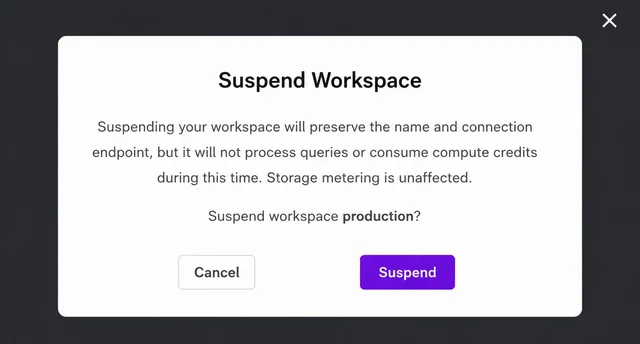
I kept the cluster available in case I needed to restore anything, but I never needed to turn it back on.
I want to take this part of the blog post to say how much I do appreciate SingleStore’s support over the last five years. I’m about to get into the cost savings, but I couldn’t write this blog post without saying a huge thank you to SingleStore for everything they did for us. I no longer view SingleStore as a database for small businesses. I view them as a very sophisticated database option for people who need a true blend of OLAP and OLTP workloads.
The next day
On the 1st March, customers were stoked at how fast the dashboard was. A huge success. I woke up tired, attended a family breakfast and spent the rest of the day packing, as I was heading to the UK the next day.
Cost savings
A technical deep dive wouldn’t be complete without sharing our cost savings. A few disclaimers first:
- This isn’t a 1:1 comparison. I made infrastructure decisions that brought our total workload down. You should not read the image as like-for-like. This is simply our before and after spend.
- I am comparing on-demand pricing between SingleStore and our new database solutions. SingleStore say on their website that they offer reduced pricing with an annual commitment. We had an annual commitment in place, but I think it would be bad faith to share that figure here.
Here’s the breakdown:
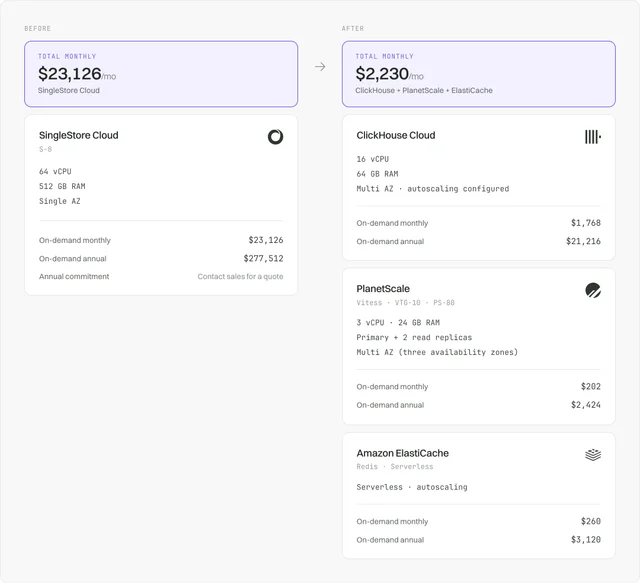
Fun fact: we had originally planned to re-architect all of this on SingleStore. They had always treated me well, and I figured we could drop down from the S-8 to an S-2. That would be 16 vCPU and 128GB RAM, meaning the same processing power as ClickHouse, more memory, and a big local disk cache. But for that, we’d be looking at $5,781/month on-demand on SingleStore, or $7,515/month if we wanted multi-AZ. That’s 4x more than ClickHouse’s on-demand pricing.
SingleStore is an HTAP database provider, specialising in the combination of OLTP/OLAP, and they’re extremely good at it. I’ve been very clear about how great they were, and I do genuinely think they are the best solution if you need true HTAP.
What now?
We have no intention of slowing down. We’ve been in the data analytics space for eight years now, and the amount of knowledge we have on running analytical workloads keeps growing. Building software isn’t hard, enduring the hard times is the hard part, and that happens when you’re in the game for a long time.
And after all is said and done, I can confirm the best is yet to come.