
Improved Event Currencies & Event Firewall
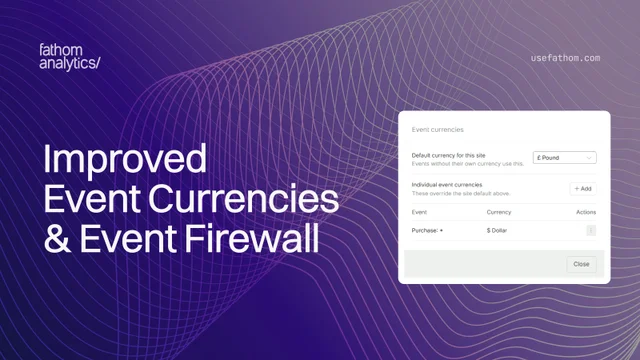
Two updates that give you more control over your events: a quicker way to set the currency for event values, and event blocking that now lives alongside the rest of your Firewall.
Set event currencies from your dashboard
If you track event values, such as the amount from a purchase or a signup plan, you can now set the currency for those values straight from your dashboard. Open the Events box, click the currency icon next to the expand and search icons, and manage everything in one place.
A default currency for the whole site. At the top of the panel you’ll find the default currency for the site. Every event without its own currency uses it. The default is None, so nothing changes until you pick one.
Currencies for individual events. Below the default, you can set a currency for a specific event. Click Add, then either search your collected event names (they autocomplete as you type) or type the exact name you pass to trackEvent, and choose the currency.
Wildcards for groups of events. Use * to match a group of names at once. For example, Purchase: * matches Purchase: Shirt and Purchase: Mug. An exact name always wins, and when two patterns match, the more specific one is used.
Each event you set appears in a tidy list with its name and currency, and a menu to edit or remove it whenever you like. Removing a currency simply returns that event to the site default.
Event currencies control how your values are shown, so figures appear with the right symbol. They do not convert between currencies.
Block or allow events from the Firewall
Choosing which events you collect now lives in the Firewall, next to your other lists. Open Settings, choose your site, select Firewall, then open the new Events tab.
As with our recent allow and block lists, you can block the event names you add, or switch the list to Allow and collect only the names you list. Wildcards work here too, so Purchase: * covers every purchase event in a single rule.
This is the place to keep junk or test event names out of your reports, and it keeps event control in the same spot as your pages, IPs, referrers, domains and countries.
Aug 25, 2026